
Welcome to a new post series; Defender Diaries. Each week we will review a feature of Microsoft Defender to understand and show how Business Premium subscriptions deliver real value to customers.
It’s 9:14am. Someone on your team gets an email that looks exactly like it’s from your finance software provider. Invoice attached. Slightly urgent tone. One click.
That’s the moment every business owner dreads. It’s also the exact scenario we decided to test properly, rather than just talking about it in theory.
So we ran a controlled phishing simulation against a live Microsoft 365 Business Premium environment, with Defender for Business switched on, to see exactly what happens between “click” and “compromised.” No scaremongering. No vendor slides. Just what we saw on screen.
The Setup
We used a realistic phishing email, the kind your team probably gets several times a week without realising it. Spoofed sender domain, a familiar brand, a link to a fake login page designed to harvest credentials.
The environment had Microsoft 365 Business Premium configured with:
- Microsoft Defender for Office 365 (email and link protection)
- Defender for Endpoint on the test device
- Standard Safe Links and Safe Attachments policies switched on
This is roughly what most M365 Business Premium customers have available the moment they’re licensed for it. Whether it’s actually configured properly is a separate question, and one we’ll get to.
What Defender Caught
The email itself. Defender’s anti-phishing policies flagged the sender domain as suspicious before it landed cleanly in the inbox. In a properly configured tenant, this email would have been quarantined or stamped with an external sender warning rather than arriving looking trustworthy.
The link. When we clicked through, Safe Links intercepted the URL and rewrote it, checking it against Microsoft’s threat intelligence in real time before allowing (or in this case, blocking) the redirect to the fake login page.
The endpoint. On the device itself, Defender for Endpoint logged the click as a suspicious activity and tied it back to the user and device in the security dashboard, giving us a full timeline of exactly what happened and when.
In a properly configured Defender setup, this attack should never have reached a real login page.
What It Didn’t Catch (And Why That Matters More)
This is the bit most vendors don’t tell you.
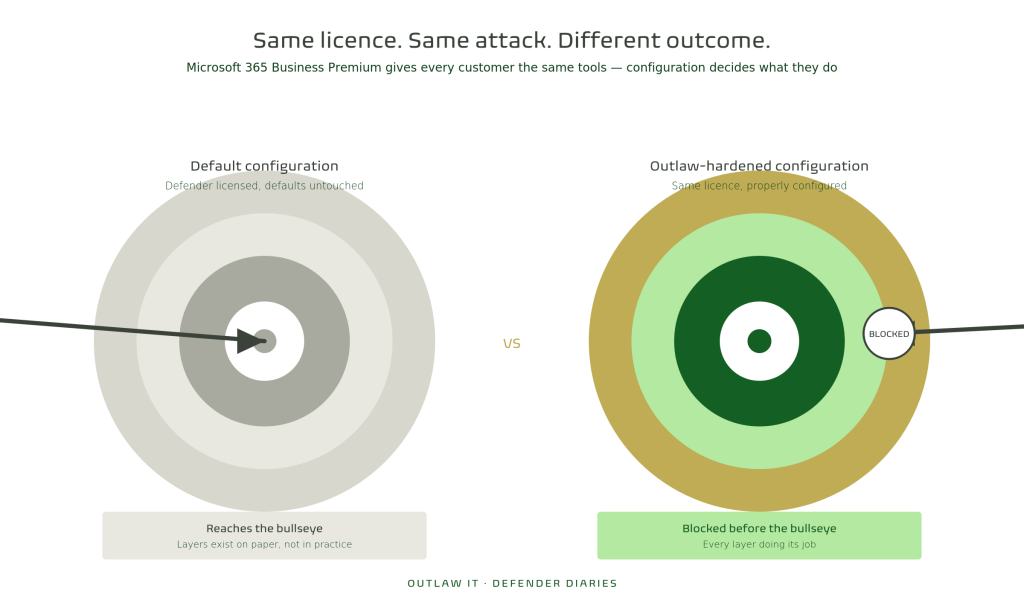
Out of the box, Microsoft 365 Business Premium licenses give you access to Defender, but it doesn’t switch itself on in its strongest configuration by default. In our experience auditing client tenants across Nottinghamshire and the Midlands, we regularly find:
- Safe Links and Safe Attachments policies that exist but aren’t applied to all users
- Anti-phishing policies left on Microsoft’s default thresholds, which are noticeably less aggressive than what’s recommended for SMBs
- No alerting set up, meaning an IT team (or business owner) might not even know a click happened until much later
The tool was capable of stopping this. Whether it actually does comes down entirely to how it’s configured.
This is the gap we see most often. Businesses pay for Business Premium because they’ve been told it includes “enterprise-grade security,” which is true. But the license alone isn’t the same as the protection actually being switched on.
The Real Lesson Here
A phishing click isn’t really an “if.” Industry data consistently shows phishing as the single most common entry point for cyber attacks against small businesses, and no amount of staff training fully eliminates the risk. People are busy, emails look convincing, and it only takes one tired Monday morning click.
What you can control is what happens after the click. That’s the difference between a near-miss your IT team logs and laughs about, and a ransomware incident that takes your business offline for a week.
So, Is Your Defender Actually Switched On?
If you’re a Microsoft 365 Business Premium customer, there’s a good chance you’re already paying for the tools that would have stopped the attack we just ran. You just need to know whether they’re configured to actually do it.
This is exactly what we check in our Free M365 Assessment, a no-obligation review of your current Microsoft 365 environment, including your Defender configuration, so you know precisely where the gaps are before someone finds them for you.
Book your Free M365 Assessment →
Next in Defender Diaries — Part 2: “‘We’ve Got Antivirus’ Isn’t a Security Strategy Anymore.” Why traditional antivirus thinking is leaving Midlands businesses exposed, and what’s changed.